An earlier post covered building a local LLM stack with Ollama, Open WebUI, and Continue. That stack was about getting something running — a chat box, a model in the IDE, a feel for what local inference looks like. This follow-up takes the next step: turning that stack into an actual coding agent that can read files, run tools, and edit code on your behalf, on a laptop GPU with only 4 GB of VRAM.
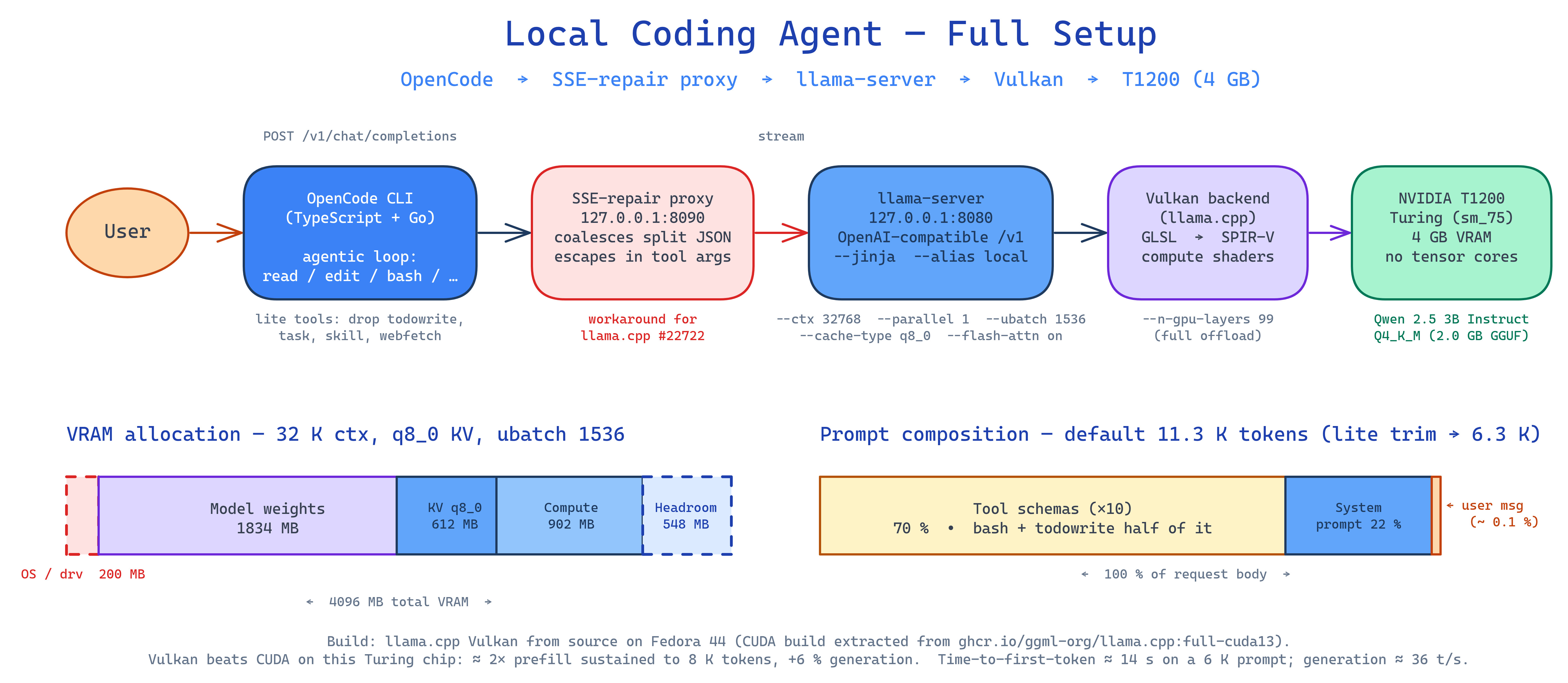
The short version: the easy path stops working once tools enter the picture. Prompt sizes balloon, model behavior gets format-sensitive in unexpected ways, and tools that “just work” for a chat UI develop sharp edges. What follows is a tour of the rough spots and a configuration that holds up in practice.
Moving Off Ollama
Ollama’s strength is the on-ramp: one command installs it, one command pulls a model, one command runs it. That friendliness is exactly why the previous post used it. Beyond the on-ramp, though, the abstractions start to get in the way — picking quantization formats, swapping chat templates, and observing exactly what the inference engine sees all become things worth doing. The community write-up Stop Using Ollama catalogs the broader case: a throughput gap versus llama.cpp, the Modelfile redundancy on top of the GPT-Generated Unified Format (GGUF), missing attribution to llama.cpp, and a recent pivot toward routing prompts through a hosted cloud. None of those bite during the friendly first hour, but they all matter once the stack becomes something to depend on.
Building llama.cpp: The CUDA Detour
The official llama.cpp releases ship Ubuntu binaries — including CUDA 12.4 / 13.1 and Vulkan variants — plus install paths via brew, nix, winget, and Docker. None of those are an obviously good fit on Fedora 44. There is no Fedora package; running the Ubuntu binary on a different distro is the kind of thing that works until it doesn’t (glibc and shared-library mismatches), which is hard to trust for a daily driver; brew and nix mean installing a whole package manager just for this; and Docker adds a container layer in front of a tool that is more pleasant to run natively. Building from source was the cleanest path.
Vulkan compiled out of the box. CUDA was a half-day rabbit hole. Fedora 44 ships GCC 16; CUDA 13.2 only supports up to GCC 15, and CUDA 12.9 only up to GCC 14. There is no overlap. Bypassing the version check with -allow-unsupported-compiler reveals the real problem: nvcc’s frontend cannot parse GCC 16’s libstdc++ headers (char8_t, requires-clauses, concepts). This is not a lint error; the parser truly does not understand the syntax.
After bouncing off both CUDA versions, the resulting setup has two flavors built locally and a third lifted out of a container:
| Backend | How |
|---|---|
| CPU only | Local CMake, system GCC 16 |
| Vulkan (NVIDIA + Intel iGPU) | Local CMake, system GCC 16 |
| CUDA 13 (NVIDIA) | Extracted from ghcr.io/ggml-org/llama.cpp:full-cuda13 |
The Docker escape hatch is worth knowing about. The official image already contains a working CUDA build; pulling it, copying /app/ and /usr/local/cuda-13.1/.../lib/ to the host, and patching RPATH so the binary self-locates produces working llama-cli, llama-server, and llama-bench binaries with no CUDA toolkit installed. libcuda.so.1 comes from the NVIDIA driver; everything else (cudart, cuBLAS) ships with the extracted bundle.
Vulkan Held Its Own — and Then Some
The conventional wisdom is that CUDA is the fast backend and Vulkan is the “works without nvcc” fallback. The numbers tell a different story. Running llama-bench on Qwen 2.5 3B Q4_K_M with --n-gpu-layers 99 --flash-attn on --cache-type-k q8_0 --cache-type-v q8_0 --ubatch-size 1024 --repetitions 5 on an NVIDIA T1200 (Turing, compute capability 7.5):
| Test | Vulkan (T1200) | CUDA (T1200) | Winner |
|---|---|---|---|
| pp512 (prefill) | 484.28 t/s | 241.65 t/s | Vulkan 2.00× |
| pp2048 (long prefill) | 447.22 t/s | 228.15 t/s | Vulkan 1.96× |
| pp8192 (very long prefill) | 334.93 t/s | 176.09 t/s | Vulkan 1.90× |
| tg128 (generation) | 36.09 t/s | 34.02 t/s | Vulkan +6.1% |
A note on the column headers: pp512 is prompt processing of a 512-token prompt — the prefill phase, where the model reads the input — and pp2048 / pp8192 are the same with longer prompts. tg128 is text generation of 128 tokens — the decode phase, where the model emits output one token at a time. The numbers are tokens per second; higher is better. Standard deviations were under 0.5% across runs, so these are not noise. Prefill throughput drops with sequence length on both backends (attention is roughly quadratic in sequence length), but the Vulkan-roughly-2× margin is sustained out to 8 K tokens — the regime that matters most for an agentic coding workload.
Vulkan is decisively ahead at prefill, a hair ahead on generation, and stays GPU-bound (the GPU is the slow link, the CPU mostly waits) while CUDA pegs a single CPU core, becoming partly CPU-bound (the CPU dispatch loop is the slow link, the GPU sits idle between operations). GPU-bound is what you want on a discrete GPU — it means the hardware you bought is actually the bottleneck, not the dispatch overhead.
For an interactive coding agent — where the prompt is dominated by long system prompts and tool schemas — prefill is the metric that matters, because it controls time-to-first-token. Plausibly, llama.cpp’s CUDA matmul kernels lean on tensor cores that this Turing chip lacks (the T1200 uses the TU117 die, which omits them entirely), while llama.cpp’s hand-tuned Vulkan compute shaders (written in the OpenGL Shading Language, then compiled to SPIR-V, Vulkan’s Standard Portable Intermediate Representation) run Single Instruction, Multiple Threads workloads — the GPU execution model that runs the same kernel across many threads in lockstep — well on this generation of hardware. This is not a general “Vulkan beats CUDA” claim — it reflects this specific GPU (Turing, no useful tensor cores for the relevant kernels), this version of llama.cpp (with mature Vulkan compute shaders), and this model size. On newer NVIDIA hardware where the CUDA tensor-core paths fire, the picture would likely flip. The takeaway is narrower: do not assume CUDA is the right backend by default — measure on your hardware.
Picking the Model: Qwen 2.5 3B Instruct
Qwen 2.5 3B Instruct Q4_K_M is about 2.0 GB. The Q4_K_M suffix is llama.cpp’s quantization shorthand: 4-bit weights using the “K-quant” scheme (groups of weights share scaling factors stored at higher precision), with M being the medium-quality variant. With --n-gpu-layers 99 all 36 layers fit on the T1200’s 4 GB, leaving over 1 GB of headroom for the KV cache and compute buffers. It is small enough to be snappy and large enough to follow tool-use instructions reasonably well most of the time.
Several other small models were evaluated before settling here:
- Qwen 2.5 Coder is the obvious-looking choice for a coding workflow, and it is wrong. The Coder variant was post-trained on a
<tools>tag format, while Qwen Instruct (and llama.cpp’s parser) expect the Hermes-style<tool_call>format. Asking Coder to emit<tool_call>is futile — across configurations it produced markdown JSON fences,<tool>tags, and doubled-brace JSON, but never a parseable tool call. Use Coder for completion and “explain this function,” not for agentic tool use. - Qwen 3-4B Q4_K_M is a viable step-up. Tool calling is structured and correct, the model fits at full offload, and pass rates on mid-difficulty tasks are meaningfully better than the 3B. The trade-off is roughly 3× the per-task latency, much tighter memory headroom (~250 MB instead of ~1.2 GB), and a built-in chain-of-thought “reasoning” mode that helps on ambiguous tasks and burns tokens on obvious ones. A reasonable swap when the task warrants the wait.
- Phi-4-mini-instruct Q4_K_M does not work. The shipped chat template has no tool block, so the
toolsparameter is effectively dropped at prompt-render time and the model answers as a generic chat assistant. A KV-quantization crash on this model’s attention shape compounds the problem, forcing fp16 KV and pushing 16K context out of reach on 4 GB VRAM.
A pattern across these attempts: at the 3B–4B size band, post-training for tool use matters more than base-model recency or branding. Models advertised as supporting function calling do not always ship the chat-template wiring needed end-to-end through llama.cpp’s parser — a direct cURL probe is the right way to verify before committing.
Performance Levers on a 4 GB GPU
A handful of llama-server flags matter more than the rest when you are tight on VRAM:
--parallel 1— caps the server at one decoding slot. The Key-Value (KV) cache — the per-token attention state the model accumulates as it processes a conversation — is divided across slots, so for a single-user setup, one slot means the full--ctx-sizebudget belongs to one conversation. Raising--parallelonly helps if multiple agents share the server, and it costs context per slot.--cache-type-k q8_0 --cache-type-v q8_0— quantizes the KV cache to 8-bit. Roughly halves KV memory: at 32K context on Qwen 3B that is ~1.2 GB → 612 MB. Without it, weights (1.83 GB) plus KV plus compute scratch fly close to OOM on the T1200’s 4 GB.--flash-attn on— fused attention; faster decode and smaller attention scratch. A clean win on the Vulkan backend in testing.--ubatch-size 1536 --batch-size 1536— lifts the prefill micro-batch ceiling from the default 512. With KV quantized and flash-attn fused, the freed VRAM goes into a bigger compute buffer (~902 MB) so a typical ~11 K-token OpenCode prefill costs ~8 GPU passes instead of ~23. Bisected ceiling on the T1200; pushing to 2048 OOMs the compute buffer.
A working 32K-context launch:
llama-server \
  --model qwen2.5-3b-q4_k_m.gguf \
  --device Vulkan1 --n-gpu-layers 99 --ctx-size 32768 --parallel 1 \
  --cache-type-k q8_0 --cache-type-v q8_0 --flash-attn on \
  --ubatch-size 1536 --batch-size 1536 \
  --jinja --alias local
This config leaves about 548 MB of headroom on the T1200’s 4096 MB after weights (1834 MB), KV (612 MB), and the compute buffer (902 MB), with ~200 MB held by the OS and Vulkan runtime before llama-server even starts. Tight but stable; if compute-buffer transients become a problem on long sessions, drop to 16K context with --ubatch-size 1024 to recover ~605 MB of slack.
The --alias local is deliberate: llama-server only loads one model per process and has no hot-swap, so switching models means kill-and-relaunch. Using a generic alias on every launch keeps the OpenCode config stable across model changes.
OpenCode: Wiring It Up
OpenCode is a TypeScript-and-Go agentic coding CLI. Its provider picker has no “local llama.cpp” entry, but it loads the generic @ai-sdk/openai-compatible package on demand. Drop a config file:
{
  "$schema": "https://opencode.ai/config.json",
  "model": "llama-local/local",
  "tools": {
    "todowrite": false,
    "task": false,
    "skill": false,
    "webfetch": false
  },
  "provider": {
    "llama-local": {
      "npm": "@ai-sdk/openai-compatible",
      "name": "Local llama.cpp",
      "options": {
        "baseURL": "http://127.0.0.1:8080/v1",
        "apiKey": "sk-local"
      },
      "models": {
        "local": { "name": "Local llama.cpp (whatever is loaded)" }
      }
    }
  }
}
baseURL ends in /v1 — that is where llama-server’s OpenAI-compatible routes live. The apiKey value is irrelevant to llama-server, but the field must exist and be non-empty; the sk- prefix is OpenAI’s convention for “secret key” (real OpenAI keys look like sk-proj-…), so sk-local is just a placeholder that satisfies any client-side “looks like a real key” check. The model ID local matches the --alias from the launch command.
One footgun worth knowing about: llama-server’s streaming path occasionally splits a JSON \n escape across two Server-Sent Events, which collapses every newline in files written via OpenCode’s write tool into a space — tracked upstream as llama.cpp #22722, with a workaround in the form of a tiny SSE-repair proxy on the wire.
The Prompt Is the Bottleneck
The most surprising finding from this exercise came from inserting a small logging proxy between OpenCode and llama-server and dumping a real request body. For a one-shot user message (“List the files in this directory using your tools.”) in a clean directory, the captured request was 53 KB / ~11.5 K tokens. Composition:
| Component | Size | % of request |
|---|---|---|
| System prompt | 11.7 KB | 22% |
| User message | 53 B | 0.1% |
| Tool schemas (×10) | 37.5 KB | 70% |
| JSON envelope, role/type fields, whitespace | ~3.7 KB | 7% |
Tool schemas dominate. bash (11 KB) and todowrite (9.7 KB) alone are over half the tool budget. The user message is rounding error. This is normal for agentic CLIs — Claude Code, Cursor, and Aider all send 8–15 K tokens upfront. They are designed for cloud models with 128 K+ contexts where the prompt is rounding error. On a 4 GB GPU running a 3 B model, the paradigm does not fit cleanly.
OpenCode lets you turn off tools you do not use. The tools: { ... } block in the config above disables todowrite, task, skill, and webfetch. Measured on Qwen 3B with the same harness:
| Config | Input tokens | Δ |
|---|---|---|
| Default (10 tools) | 11,330 | baseline |
| Lite (drop 4 heaviest) | 6,333 | −44% |
bash + read + glob only |
3,498 | −69% |
bash only |
2,760 | −76% (floor) |
Dropping the four heaviest schemas roughly halves the prompt while keeping bash, read, edit, write, grep, and glob available for ordinary coding work. That trim is the recommended default.
Verifying Tool Calls Actually Work
Three diagnostics are worth keeping handy:
Direct cURL against /v1/chat/completions — bypass OpenCode entirely and confirm the wire format:
curl --silent http://127.0.0.1:8080/v1/chat/completions \
  --header "Content-Type: application/json" \
  --data @- <<'EOF' | jq '.choices[0].message'
{
  "model": "local",
  "messages": [
    {
      "role": "user",
      "content": "What files are in /tmp? Use the bash tool."
    }
  ],
  "tools": [
    {
      "type": "function",
      "function": {
        "name": "bash",
        "description": "Run a shell command",
        "parameters": {
          "type": "object",
          "properties": {
            "command": { "type": "string" }
          },
          "required": ["command"]
        }
      }
    }
  ]
}
EOF
A correct response carries a structured "tool_calls": [...] field. Plain text means the model ignored the format instruction — most often the Coder-vs-Instruct trap above.
opencode run --format json — the headless mode emits one JSON event per line for every step (step_start, text, tool-call, tool-result, step_finish, error). Easy to grep:
mkdir /tmp/oc-test && touch /tmp/oc-test/{a,b,c}.txt
opencode run --dir /tmp/oc-test --format json \
  "List the files in /tmp/oc-test using your tools and report the count."
Watch for a tool-call event in the stream. Its absence means the agent never invoked a tool — usually a tool-format problem upstream. Pass --dir explicitly: opencode run does not inherit the shell’s cwd, and tool calls otherwise operate against OpenCode’s default working directory.
/props on llama-server — sanity-check what the server actually loaded:
curl --silent http://127.0.0.1:8080/props \
  | jq '{chat_template, model_alias, bos_token, eos_token}'
Performance in Practice
Latency on Qwen 2.5 3B Q4_K_M on a T1200 with the lite config (~6.3 K-token prefill):
- Time-to-first-token: ~14 s for a 6 K-token prompt at ~447 tokens/s prefill on Vulkan.
- Generation: ~36 tokens/s. Snappy enough to read along.
- Total turn: 20–30 s for a typical agent step that involves one tool call plus a short follow-up reply.
Latency is only half the story; capability is the other half. A 3B model quantized to 4 bits is genuinely small, and that shows up in the kinds of work it handles well. In practice, the setup is reliable for reading a few files and answering factually, applying a single targeted edit when the change is named in the prompt, and renaming a symbol across files when those files are enumerated. It is much less reliable when asked to write new files from scratch, run a test-driven loop against more than one or two cases, fix a bug whose symptom is not named, or address two issues in the same prompt. Prompts that spell out the diff, name the files, and ask for one thing at a time get noticeably more out of this model than prompts that delegate decisions.
These limits are a function of model size, not the local-stack architecture. The 4 GB VRAM ceiling on this hardware caps what fits at full offload — a 4B model like Qwen 3-4B passes meaningfully more of the same work at the cost of higher latency and tighter memory headroom, and a 7B+ model on a card with more VRAM would close the gap further. The plumbing described in this post — llama.cpp, Vulkan, the OpenCode wiring — scales straightforwardly to those larger setups; the model in the slot is what changes.
This setup will not match a frontier hosted model like Claude Opus. It is, however, fully local, runs while offline, leaks nothing, and — when prompts are shaped to its strengths — handles the small, well-scoped tasks that make up a meaningful share of day-to-day coding work. For sustained reasoning or larger refactors, a stronger local model on heftier hardware, or a hosted model, remains the right tool.
Configuration Summary
The setup that emerged from this exercise:
- Backend: Vulkan build of llama.cpp on a Turing GPU. CUDA was slower at prefill on the 3B model, and on a 7B partial-offload test it crashed at long prompts where Vulkan held up — Vulkan is the safer default on this hardware.
- Model: Qwen 2.5 3B Instruct Q4_K_M. Not the Coder variant.
- Server flags:
--ctx-size 32768 --parallel 1 --cache-type-k q8_0 --cache-type-v q8_0 --flash-attn on --ubatch-size 1536 --batch-size 1536 --jinja --alias local. - OpenCode: generic
@ai-sdk/openai-compatibleprovider, lite tool set (droptodowrite,task,skill,webfetch), pinned tolocal.
The previous post stood up the runtime; this one makes it useful for actual work. The path between those two states is shorter than it looks once the gotchas are visible — but few of them are obvious from the docs, and several can quietly consume an evening. Hopefully this write-up saves a few of those.